Powerful call list management
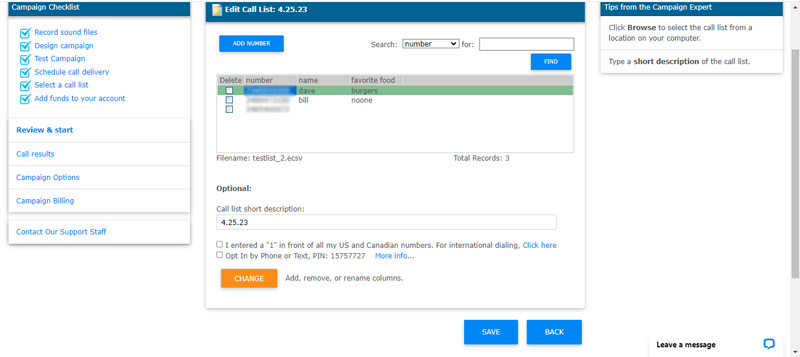
VoiceShot can use your existing call lists from the applications that
you are most familiar with such as Microsoft Excel and Access as well
as industry standard formats such as ASCII comma delimited. You
can also view, edit, search, add or remove contacts from your call lists
right from your VoiceShot account with our online list management tools.
Schedule call delivery times
Set delivery dates and times. Run a call campaign at different
times in a single day or spread it out over multiple days.
Organize your messages and call lists into "Call Campaigns"
VoiceShot voice broadcast automatically organizes your voice messages
and call lists into call campaigns. Call campaigns can then be scheduled,
modified, reused and compared to one and other to get you the results
you want.
Total Web based campaign control
Start, stop, pause, speed up or slow down a campaign from within
your VoiceShot account.
Connect to live operator
Allows those who receive your voice message the ability to press a key
and instantly the call is routed to the phone number of your choice
for no additional charge.
Conditional call branching
Build as simple or as detailed of a call design as needed. Voice
broadcasting call flow can be controlled by the call recipient input,
branching to specific points based on the call recipient's key presses.
Branch on specific key presses, no key presses and incorrect key
presses.
Key press verification
When a call recipient presses one or more keys in response to a
voice prompt, you can optionally have the key presses spoken back to
the call recipient, with the option for the call recipient to re-enter
or accept.
Powerful call transfer management
Transfer call recipients to a phone number of your choice - perfect
for "press 0 for a live operator" applications. VoiceShot's powerful
call transfer management can automatically pause dialing when all of
your available operators are talking and resume dialing as soon as one
becomes available.
On-hold custom music or message
Call recipients can listen to a unique message or music selection
that you record. Re-enforce your sales message or choose a music
selection that fits your target audience to a tee.
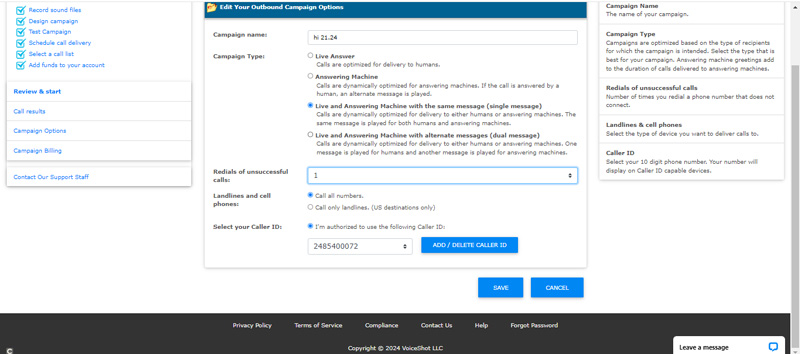
Automatic re-dial of unsuccessful calls
Calls that were not answered are automatically re-dialed free of charge.
You can even choose additional re-dialing with VoiceShot's one click
re-dial feature.
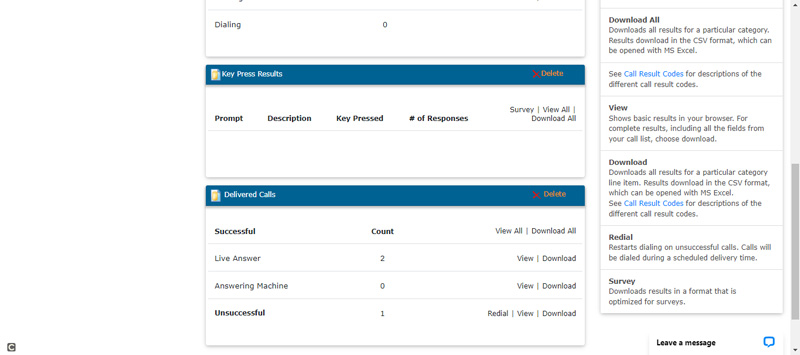
Reporting of caller response by key press
Real-time reporting captures all recipient key presses allowing
you to identify call responses. Additionally, call responses are
matched up with all the information from your call list, making it easy
to identify which recipient produced which responses. Download
your voice broadcasting results into Microsoft Excel and other applications.
Automated interactive opt-out mechanism for live recipients
Automated key press opt-out allows live call recipients to opt-out of
future calls via a simple telephone key press. Those who choose
to opt-out are automatically added to your Do Not Call list and removed
from future call campaigns.
Automated interactive toll free opt-out mechanism for answering
machine recipients
Get a VoiceShot interactive toll free phone number to insure that those
who listen to your prerecorded message on an answering machine device
are able to opt-out of future call campaigns. Callers can dial your
Toll Free number then listen, interact and respond to prerecorded messages
that you create. For example, your prerecorded message greeting
could ask callers to key in their 10 digit phone number resulting in
an easy opt-out request via a simple telephone key press mechanism.
Options to review, verify and confirm key press information helps
to insure that the opt-out information provided is correct. Caller
key press information can be then be uploaded to your Do Not Call list
resulting in removal from future call campaigns.
Do Not Call list management
Professional Do Not Call list management tools allow you to honor the
request of those who wish to opt-out of future call campaigns. Call
recipients can add themselves to your Do Not Call list by pressing a
key during the call. In addition, you can upload your existing
Do Not Call list into your account and VoiceShot will automatically
remove any number on the Do Not Call list from all of your future call
campaigns.
Automatic removal of duplicate numbers
This feature ensures that you do not send duplicate calls to the same
recipients and saves you money by removing these numbers from you call
list prior to launching your call campaign.
Voice Merge with text to speech (TTS)
Personalize each message for the intended recipient with realistic
human sounding text to speech (TTS). Send alerts and notifications,
reminders, rates, names, numbers and more. Choose either a male
or female voice and even control pitch, speed and the volume of the
voice used.
Web-based auto-dialer
More powerful than the most expensive auto-dialer. Easier
to use than any traditional auto-dialer. Best of all no auto-dialer
or equipment is needed to use VoiceShot.
Personalized service
A VoiceShot voice broadcast account representative will take the time
to get you started using VoiceShot and will continue to support your
needs on an ongoing basis.
Telephone and email support
Assistance and technical support available via email and telephone,
with quick response time. At VoiceShot, the customer always comes
first.
No charge for busy, no answer, disconnected numbers or transfers
VoiceShot only charges for successfully delivered calls. Calls
that are transferred to another number are billed as a single call.